Example – Attribute Notification
This is an example of how a device attribute of type JSON will be delivered as a notification.
- Assume the device wants to send the following temperature setting as a JSON attribute:
Temperature Attribute
{
"temperature" : 72,
"units" : "F"
}
- Create the Attribute in the Product with a JSON attribute with name Temperature.
- Refer to Portal Guide – Configure Product/Endpoint - Attribute
- Refer to Portal Guide – Configure Product/Endpoint - Attribute
- Configure the notification template per Step 1:
- Select Attribute Output
- Give it a name: TemperatureOutput
- Associate it with the Temperature attribute.
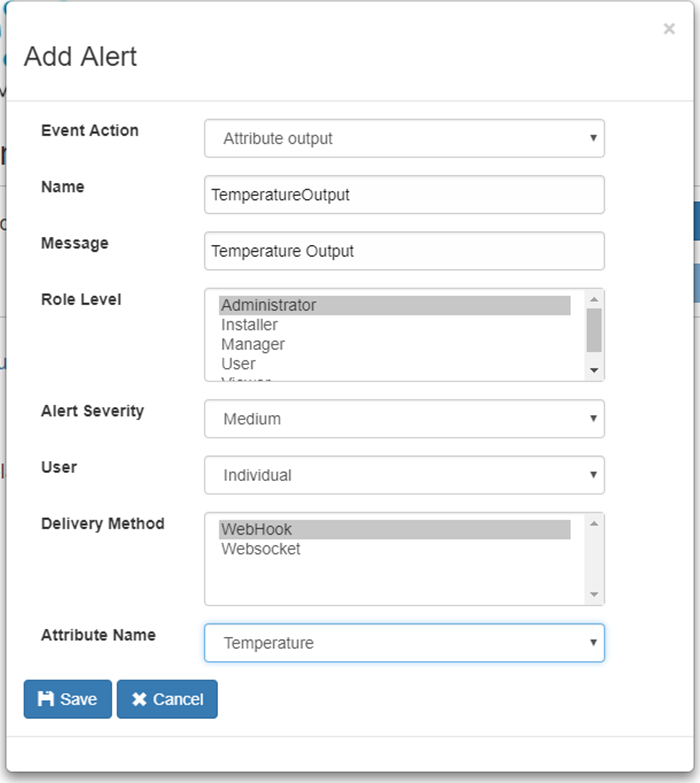
- Create the Preference and Subscribe per Steps 2 and 3:
- Now assume the device will send the JSON for Temperature
Temperature Attribute Send
{
"temperature" : 72,
"units" : "F"
}
- The notification that is delivered to the Webhook if the default output is chosen:
Notification Output Default
{
  "priority": 0,
  "cuId": "NSTST3",
  "data": {
    "value": {
      "temperature": 72,
      "units": "F"
    },
    "sku": "Tracker123",
    "name": "Temperature",
    "localId": 1,
    "mfgId": null,
    "deviceId": "ID789"
  },
  "message": "Temperature Output",
  "messageType": 28,
  "timeStamp": "2017-10-18T20:06:22+00:00"
}
- The notification that is delivered to the Webhook if the Value Only output is chosen:
Notification Value Only
{
"temperature" : 72,
"units" : "F"
}